Grid Trading on Aster: How the Grid Bot Works, Setup, and When It Loses Money
Fees and rules are checked against Aster's documentation at docs.asterdex.com, and live market figures come from Aster's public API. How we verify
Table of Contents
- How grid trading works
- Neutral, long and short grids
- Setting up a grid on Aster, step by step
- Auto parameters
- Manual parameters
- Margin mode, leverage and limits
- Starting from the Marketplace
- Choosing the range and grid count
- A worked example
- When a grid bot loses money
- 1. Price breaks out of the range
- 2. Funding on the open position
- 3. Fees on every fill
- 4. Leverage and liquidation
- Grid vs DCA vs manual limit orders
- Fees on grid trades and the MMTz04 referral rebate
- The short version
A grid bot on Aster lays a ladder of buy limit orders below the current price and sell limit orders above it, inside a range you choose. Every time price drops to a buy and climbs back to the next sell, that pair closes for a small profit and the bot re-arms the order. It earns while price chops sideways inside the range, and it loses when price breaks out and keeps going.
Aster's grid bot runs on its perpetuals, comes in neutral, long and short flavors, and can pick its own range or take yours. It profits from oscillation, not direction. Its real risk is a breakout: the bot ends up holding a position that is moving against it, and funding, fees and leverage make that worse.
How grid trading works
A grid splits a price range into evenly spaced levels. Aster's docs describe the starting layout: based on the latest price, the system places sell limit orders above the market and buy limit orders below it, with one order per level plus one more, since no position is held yet. The level nearest the market is left out.
From there the grid runs on a simple loop:
- Price falls and fills a buy order. The bot places a sell one level above it.
- Price rises and fills that sell. The pair is now "matched", and the gap between the two levels, minus fees, is profit.
- The bot replaces the buy, and the cycle repeats as long as price keeps crossing levels.
That matched profit is the number grid traders care about. Aster's grid details split performance into Matched Profit (realized gains from completed pairs), Unmatched PnL (the open position, valued at mark price), Funding Fee and Trading Fees. A grid can show healthy matched profit and still be underwater overall, because the unmatched position is losing more than the pairs have earned. Most of this guide is about that gap.
Neutral, long and short grids
Aster supports three directions, and the setup panel describes each in one line:
- Neutral: for range-bound markets. It starts with no position. If price falls, buys fill and it builds a long; if price rises, sells fill and it builds a short.
- Long: for trending or volatile bull markets. It opens with an initial long position and runs the grid around it.
- Short: the mirror image, opening with an initial short.
The docs give a long-grid example: a trader who is bullish on BTC opens a long on BTCUSDT, then places buys every $1,000 below the price and sells every $1,000 above it, keeping the directional exposure while trading the swings. So a long or short grid is a directional bet with a grid layered on top.
Setting up a grid on Aster, step by step
Grids live on the perpetuals side of Aster. If you haven't traded there yet, our guide to trading on Aster covers connecting a wallet and funding the account first.
Open the grid page
Connect your wallet on asterdex.com, hover over More in the top menu and choose Grid Trade. Pick the market from the symbol selector.
Choose Auto, Marketplace or Manual
The right-hand panel has three tabs. Auto fills in a range and grid count for you, Marketplace lets you start from a running grid, and Manual lets you set every value.
Pick a direction
Select Neutral, Long or Short.
Set margin mode, leverage and spacing
Choose Cross or Isolated, set the leverage, and choose Arithmetic or Geometric spacing.
Enter initial margin and create
Type your initial margin in the settlement asset. The panel shows Qty Per Order and Total Investment. Review them, then click Create and confirm.
Auto parameters
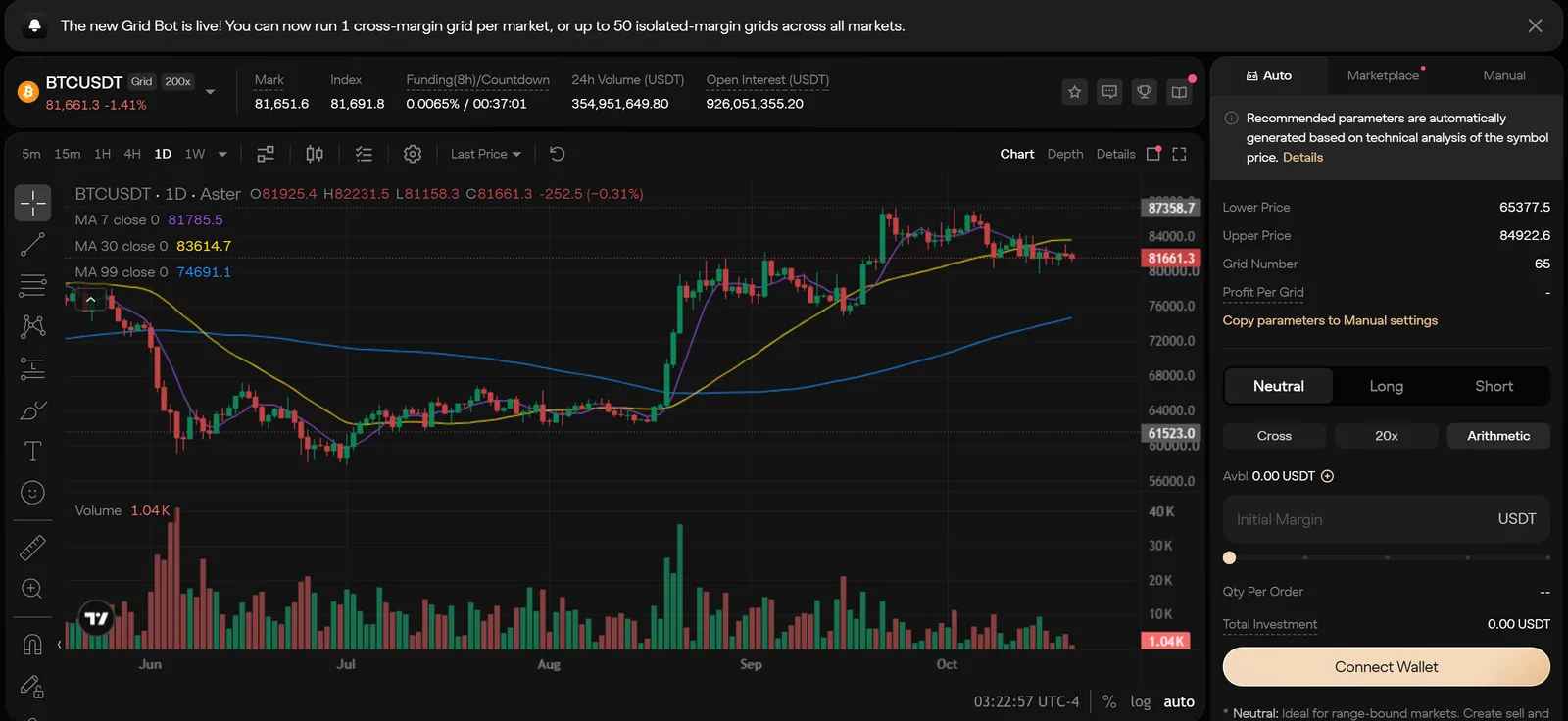
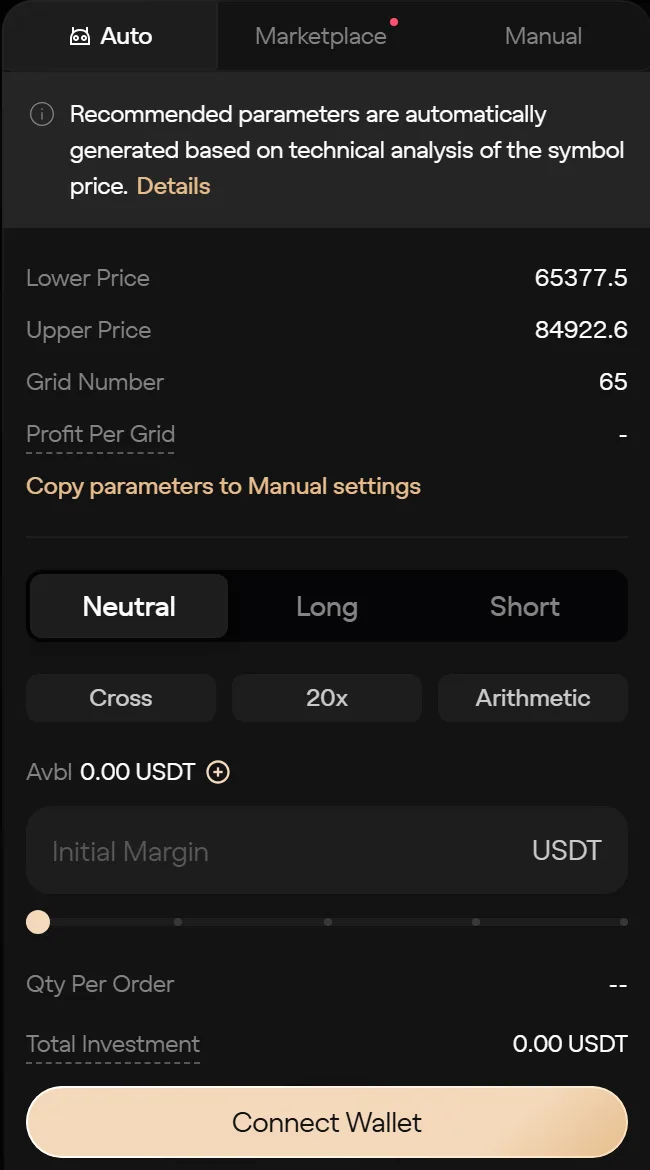
The Auto tab fills in a lower price, an upper price and a grid number. Aster's docs explain where they come from: the range is a pair of Bollinger Bands (a moving average plus and minus a multiple of the standard deviation), and the grid count is the range divided by the Average True Range over a recent window. On BTCUSDT on the day we checked, Auto suggested 65,377.5 to 84,922.6 with 65 grids.
Auto needs trading history. On a market without enough of it, the docs say the function won't work, and you either set values manually or click Copy parameters to Manual settings and edit from there. That button is also the sensible way to use Auto: take its range as a starting point, then check it against a chart you trust.
Manual parameters
On the Manual tab you set the lower and upper price, the number of grids and the spacing yourself. Two optional controls matter more than they look:
- Grid trigger. The grid stays dormant until price crosses a level you set, measured by last price or mark price.
- Stop trigger. An upper and lower stop. If price breaches either, the grid stops, and you choose whether open orders are cancelled and the position closed automatically or by hand.
The stop trigger is your answer to the breakout problem described below. Set it.
Margin mode, leverage and limits
Under Aster's Grid 2.0, each grid runs in its own subaccount, and creating one moves the initial margin out of your perpetuals balance. The docs flag the side effect: that transfer lowers the margin available to your other positions. You can add or remove margin on a running grid, but you can't change its margin mode while it runs.
- Cross: one cross grid per trading pair, and cross grids with the same settlement asset share one margin pool. A liquidation in that pool can hit all of them.
- Isolated: up to 50 isolated grids across the account, more than one per pair if you like, each with its own margin and its own liquidation risk.
Leverage is set in the panel. BTCUSDT showed 20x as the starting value when we checked, well below the market's 200x cap, and you can lower it. The panel works out the minimum margin from the grid count, leverage and range; denser grids need more. Each grid order also has to clear the market's minimum order size, so a large grid count on small margin will be rejected.
A few things stop a grid from being created at all, per the docs: holding open orders or a position on that symbol, running in Hedge Mode instead of One-Way Mode, or not holding the settlement asset (Aster won't convert another asset for you). Grid 2.0 is available on main accounts; grids created from regular subaccounts keep the older mechanism.
Starting from the Marketplace
The Marketplace tab shows running grids from other users, sortable by PnL or ROI, with each one's direction, leverage, runtime, range and minimum investment. Copy brings its parameters into your panel; Reverse flips a long grid to short or the other way round (not available for neutral). Either way you get an independent snapshot that doesn't follow the original, and Aster warns when price has already left the copied range.
A grid shown there was picked because it has done well so far. That says nothing about what happens next. If you'd rather your own grids stayed off the list, Aster's Account Privacy setting removes them at the next update, in line with the platform's other privacy controls.
Set up your first grid on Aster
Sign up with code MMTz04 and, under Aster's documented referral terms, 5% of the trading fees you pay is credited back to you. Start with a small isolated grid and a stop trigger before you scale anything.
Trade on Aster - 5% Fee RebateChoosing the range and grid count
The range and the number of grids decide almost everything about how a grid behaves. Aster's panel describes the two spacing modes this way: Arithmetic divides the range into equal price intervals, ideal for narrow, stable ranges, while Geometric divides it into equal percentage intervals, ideal for markets with larger swings.
A worked example
These are round numbers chosen to make the arithmetic easy to follow. They aren't a forecast or a suggested setting.
Say BTC trades at 70,000 and you set a range of 60,000 to 80,000 with 20 grids, putting roughly $10,000 of position size to work. That's about $500 per order. (The panel calculates the real Qty Per Order for you.)
| Arithmetic | Geometric | |
|---|---|---|
| Spacing | Every $1,000 | About 1.45% per level |
| Gap at the bottom (near 60,000) | $1,000, about 1.67% | About $870 |
| Gap at the top (near 80,000) | $1,000, about 1.27% | About $1,140 |
| Gross profit per matched pair near 70,000, $500 order | About $7.14 | About $7.25 |
Arithmetic grids earn more per pair at the bottom of the range and less at the top, because the same dollar gap is a bigger percentage of a lower price. Geometric grids keep the percentage even. On a narrow range the two are nearly identical; on a wide one, the difference adds up.
Grid count is a trade-off:
- More grids means smaller gaps, more matched pairs in a choppy market, and less profit per pair. Fees take a larger share of each pair, and the panel will ask for more margin.
- Fewer grids means wider gaps, fewer fills, and more profit per fill. In a quiet market the grid can sit for days without matching anything.
The gap between levels has to be comfortably larger than what a round trip costs, or the grid trades a lot and nets little. At 0.04% taker on each side, crossing the spread twice costs 0.08% of the order, which is small next to a 1.45% gap but not next to a 0.1% one.
When a grid bot loses money
Grid profit is many small, capped wins. The losses aren't capped in the same way, and there are four places they come from.
1. Price breaks out of the range
This is the main one. Take the example grid, started neutral at 70,000, and suppose price slides to 55,000 and stays there. On the way down every buy fills: ten orders of about $500 each, between 69,000 and 60,000, for an average entry near 64,500. At 55,000 that long is down roughly $730, and below 60,000 there are no more levels to sell into. The matched profit earned on the way down, a handful of $7 pairs, doesn't come close to covering it.
The upside breakout is the mirror image for a neutral grid, which ends up short. A long grid suffers most on a breakdown, and a short grid on a rally. The docs warn about exactly this: if the settings are unreasonable, you may not capture grid revenue when the market moves one way outside your range. A stop trigger outside the range caps the damage; without one, the grid simply holds the position.
2. Funding on the open position
A grid's unmatched position is an ordinary perpetual position, and it pays or receives funding like any other. Aster lists it as its own line in the grid's PnL. A grid stuck holding a large long during a stretch of positive funding pays every interval, and funding intervals vary by market on Aster, some hourly and some every eight hours. Check the market's recent rates in our funding-rate history before you run a long-lived grid.
3. Fees on every fill
Grid orders are limit orders, and Aster charges 0% on maker fills for standard crypto perpetuals, so a pair that fills on both sides as a resting order pays nothing. Fills that cross the spread pay the taker rate, and closing the grid at market pays it on the whole position. On Group B pairs the base taker fee is 0.1%, so check which group a market is in before you build a dense grid on it. Our Aster fees explainer has the full schedule.
4. Leverage and liquidation
Leverage multiplies the position the grid builds when price trends. A grid that looks safe at 3x can be liquidated at 20x on the same breakout, and Aster lists insufficient margin as one of the ways a grid ends. On cross grids, one liquidation can take the shared pool with it. Ending a grid with Keep Positions Open doesn't remove that risk either; the position stays live, and can still be liquidated, until you close it. Our guide to how liquidation works on Aster explains where that line sits.
Warning
Grids also end if you cancel any of their orders or close any of their positions by hand. Manage a running grid from its own Details page, not from the regular order panel.
Grids run on Aster's order-book perpetuals, not in the one-click 1001x mode. If you came here looking to stack a grid on extreme leverage, the breakout example above shows why that's the fastest way to lose the margin.
Grid vs DCA vs manual limit orders
Grids aren't the only way to spread entries across prices. Aster's perpetuals also offer TWAP and scaled orders, and you can always place limit orders by hand.
| Grid bot | TWAP / DCA-style | Scaled order | Manual limit orders | |
|---|---|---|---|---|
| What it does | Buys low and sells high inside a range, over and over | Splits one buy or sell into slices over time (1 minute to 7 days for TWAP) | Places up to 110 limit orders across a range, once | Whatever you place |
| Re-places orders after fills | Yes | No | No | Only if you do it |
| Best fit | Sideways, choppy markets | Building or exiting a position without moving the price | Laddering into a position at better average prices | Specific levels you have a view on |
| Main risk | Breakout leaves a losing position | Paying the average price in a trend | Ending up fully filled in a falling market | Missing fills, needing attention |
In practice, a grid suits a market you expect to oscillate. If you want to build a position over time, TWAP or a scaled order is closer to the job. If you have a view on two or three specific levels, place those orders yourself.
Fees on grid trades and the MMTz04 referral rebate
Aster's docs list no separate fee for grids. A grid's details page shows the trading fees it has paid, and fills are charged at the market's normal perpetuals rate:
- Crypto General perpetuals: 0% maker, 0.04% taker at the base tier.
- Group B perpetuals: 0% maker, 0.1% taker at the base tier.
If you signed up with referral code MMTz04, Aster pays 5% of the fees you pay back to you as a rebate, credited after the fact in the asset the fee was paid in. It isn't a discount on the order. And on a grid where most fills rest as maker orders at 0%, there isn't much fee to rebate in the first place. The rebate matters most on the taker side: grid closes at market, and markets with higher taker rates. Paying fees in ASTER is a separate 5% reduction; both are explained on our referral page.
Trade grids on Aster
Code MMTz04 returns 5% of the trading fees you pay as a rebate under Aster's documented referral terms. Pick a range, set a stop trigger outside it, and size the grid so a breakout is survivable.
Trade on Aster - 5% Fee RebateThe short version
Aster's grid bot does a narrow job: harvesting small swings in a market that stays in a range. Set it up with a range you believe in, a grid count that leaves room above fees, modest leverage, and a stop trigger outside the range. Watch funding if the grid holds a position for long. And treat the Marketplace leaderboard as a list of settings to study, not results to expect. To see every market a grid could run on, browse the markets hub.
Nothing here is financial advice. Grid trading can lose the full margin you put into it.
Frequently Asked Questions
Grid trading on Aster is an automated perpetuals strategy. You pick a price range and a number of grids, and Aster places buy limit orders below the market and sell limit orders above it, re-placing orders as they fill. Each completed buy-and-sell pair inside the range books a small profit. Aster offers neutral, long and short grids.
A grid loses money when price leaves the range and keeps going, because the bot is left holding a position that moves against it. Funding payments on the open position, taker fees on fills that cross the spread, and liquidation if margin runs short can all add to the loss. Matched grid profit only covers small moves inside the range.
Aster's interface describes arithmetic grids as dividing the range into equal price intervals, which suits narrow, stable ranges, and geometric grids as dividing it into equal percentage intervals, which suits markets with larger swings. On a wide range, geometric spacing keeps the profit per grid roughly constant in percentage terms.
Aster's docs list no separate fee for grid strategies, and the grid details page reports the trading fees each grid has paid. Standard crypto perpetuals carry a 0% maker fee and a 0.04% taker fee at the base tier, while Group B pairs carry a 0.1% taker fee. Grid orders are limit orders, so fills that rest on the book are charged as maker.
Yes. The Grid Marketplace tab shows running grids with their PnL, ROI, runtime and price range, and lets you copy the parameters or reverse a long or short grid. A copied grid is an independent snapshot and does not follow the original. Past results of the source grid do not predict yours.
Sources & Citation
How these figures were verified
- Aster official documentation (Grid Trading) — neutral, long and short grids, the grid lifecycle, trigger and stop prices, creation limits and termination rules. Checked .
- Aster official documentation (Auto Grid Trading) — how auto parameters are derived from Bollinger Bands and ATR. Checked .
- Aster official documentation (Grid 2.0) — grid subaccounts, cross and isolated grid margin, grid limits, margin adjustment, ending a grid and grid PnL components. Checked .
- Aster official documentation (Grid Marketplace) — copying and reversing grids, and how Account Privacy hides a grid from the Marketplace. Checked .
- Aster official documentation (Perpetuals: Fees) — the maker and taker rates for Crypto General and Group B perpetuals. Checked .
- Aster official documentation (Referral Program) — the referral program terms and the fee rebate paid to referred users. Checked .
- Asterpedia — the worked grid example, which uses round illustrative numbers rather than market data, and the screenshots of the BTCUSDT grid page taken on October 20, 2026. Checked .
Aster revises its fee schedules, leverage caps and token mechanics regularly, so every figure here is a dated snapshot rather than a live feed. Where a number comes from Asterpedia’s own tracking rather than the documentation, it is labelled as such above.
Cite this page
Asterpedia. "Grid Trading on Aster: How the Grid Bot Works, Setup, and When It Loses Money." Published October 20, 2026; last updated October 20, 2026. https://asterpedia.com/guides/trading/grid-trading-on-aster<a href="https://asterpedia.com/guides/trading/grid-trading-on-aster">Grid Trading on Aster: How the Grid Bot Works, Setup, and When It Loses Money</a> — Asterpedia, updated October 20, 2026Reuse
You may republish these figures with attribution and a link to https://asterpedia.com/guides/trading/grid-trading-on-aster.
Asterpedia is an independent, unofficial resource. It is not affiliated with, produced by, reviewed by, endorsed by or sponsored by Aster, asterdex.com, their operators, or their backers including YZi Labs. "Aster", "ASTER" and the Aster logo are trademarks of their respective owners, used here for identification only.
Disclaimer: Nothing here is financial, investment, legal or tax advice. Trading perpetual futures carries a substantial risk of loss. Whether any product described here is lawful or appropriate where you live, and how any trade is taxed, depends on your jurisdiction and your circumstances. Check the primary sources and speak to a qualified professional. This site contains referral links, and the full disclosure is in the site footer.
Ready to Start Trading?
Sign up to Aster with referral code MMTz04 and 5% of your trading fees come back to you as a rebate. Connect a wallet and you are trading in minutes.
Trade on Aster - 5% Fee Rebate